Piapro Studio NT2 v1.3.0.0 (Win/Mac) アップデート情報
本アップデートでは、以下の内容が更新されました。アップデート内容の全文は、こちらのページよりご確認いただけます。
過去のプロジェクトファイルとの出力音等の互換性について
本アップデートでは歌声ライブラリの更新をはじめとした、出力音声に関わるいくつかの変更点がございます。本アップデートを適用した場合、以前のプロジェクトファイルで作成していた音声とは異なる結果となります。制作途中のプロジェクトがある場合、本アップデートの適用はお控えいただきますようお願いいたします。具体的な変更内容は、アップデート内容の各項目をご参照ください。
なお、本バージョンでは、v1.2.2.2以前で作成されたプロジェクトファイル(.ppsf)を初めて読み込む際、最新形式へのデータ変換処理が行われます。変換には通常より時間がかかる場合がありますので、あらかじめご了承ください。
アップデート内容
■機能追加
- ピアノロール上からポルタメントを直接編集できる機能を追加しました。
- 本機能追加に伴い、「Automatic Control」が有効なトラック上でも、ポルタメントの編集を行えるようになりました。
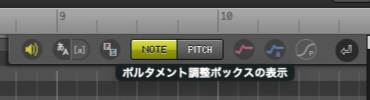
- ピアノロール上のツールバーに追加された「ポルタメント調整ボックスの表示」をオンにすると、編集可能なポルタメントがある場合、ポルタメント範囲上にボックス状のUIが表示されます。
- 「選択ツール」でボックスを左右にドラッグすると編集できます。
- 両端をドラッグすると長さを、内側をドラッグすると位置を変更できます。
- ボックス上のコンテキストメニューから、編集内容のリセットや、階段状のピッチラインへの変更が可能です。
- 階段状のポルタメントボックスをマウスで長押しするとマウスカーソルが手のひらアイコンになり、ドラッグ移動が可能です。
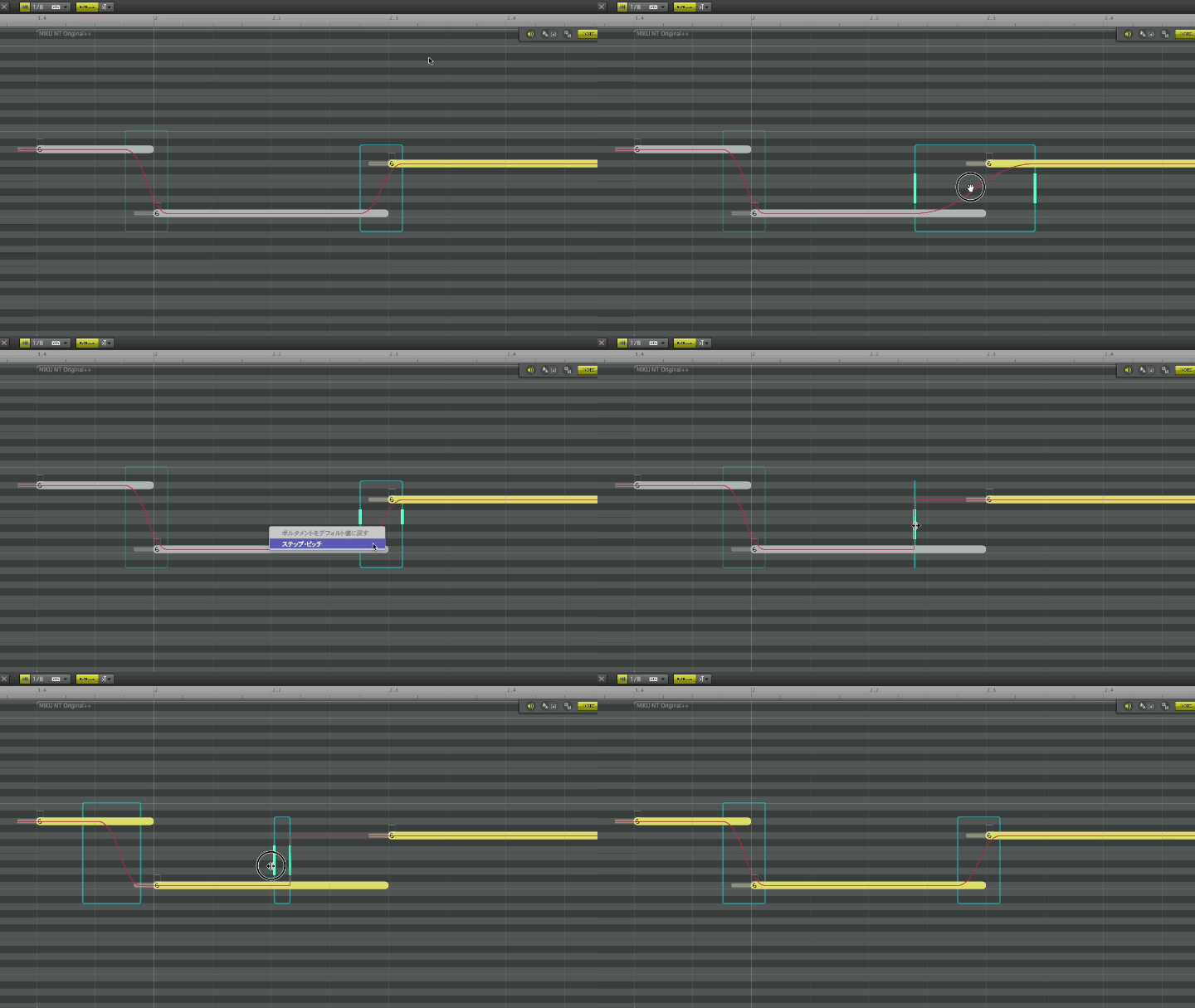
- 階段状のポルタメントボックスをマウスで長押しするとマウスカーソルが手のひらアイコンになり、ドラッグ移動が可能です。
-
「一時停止」時の動作を「停止」と同じ動作に変更できるオプションを追加しました。
- 設定は「メニュー > 再生 > 一時停止の動作」、または「再生ボタン」上でのコンテキストメニューから行えます。
-
レンダリング結果のキャッシュ機能を追加しました。
- 合成された波形データをPC上に一定期間保持することで、保存済みのプロジェクトファイルを再び読み込んだ際の負荷を軽減します。
- 設定は「Piapro Studio の設定 > 詳細 > システム > レンダリングキャッシュ」から行えます。
- 当機能を使用する場合、設定内容に従ってPCのストレージを消費しますのであらかじめご了承ください。
■仕様変更
【重要】出力音声に関わる変更点
- 歌声ライブラリのアップデート:各歌声ライブラリにおいて、ノイズ改善をはじめとしたアップデートを行いました。詳細は「初音ミク NT」「鏡音リン・レン NT」それぞれのアップデート情報からご確認いただけます。
- 過去プロジェクトのピッチライン形状の変化:ポルタメント関連の仕様変更に伴い、以前のバージョンで作成されたプロジェクトファイルを読み込んだ際、ピッチライン形状が以前とわずかに異なる場合がございます。
- Super Formant Shifterの改善:使用時のレンダリングの高速化、および合成品質を改善しました。
- Note Gainの改善:使用時の母音における挙動を改善しました。
※上述の変更に伴い、1.2.2.2以前のプロジェクトファイルを読み込んだ際、出力音が変化する場合がございます。あらかじめご了承ください。
【重要】ポルタメント編集に関わる変更点
- 「ノートの設定」パネル内からポルタメント関連の項目を削除:上述の機能追加および仕様変更による影響となります。今後はピアノロール上のボックスから直接編集を行えます。
- 「自動推定をオフ」にしたトラック上で、ポルタメント編集時の制限を緩和しました。
その他の仕様変更点
- 再生の「停止」操作時において、最後に指定した位置まで再生バーが戻るよう挙動を改善しました。
- ノートのトランスポーズ時にも、サンプル音が鳴るよう挙動を変更しました。
- マウスホイールの設定について、Studio Oneの操作タイプにFender Studio Proを併記するよう表記を更新しました。
- プロジェクトファイルの読み込み時に、現在使用できない歌声ライブラリが設定されていた場合、通知を表示するよう挙動を変更しました。
- 過去バージョンで保存したプロジェクトファイルの読み込み時に、ピッチカーブの「自動推定」モードと「手動設定」モードが混在しているトラックがあった場合、いずれかのモードへの統一を促す警告を表示するよう挙動を変更しました。
■バグ修正
- 自動バックアップが行われているタイミングで保存を行うと、クラッシュする問題を修正しました。
- 「Logic Pro」または「GarageBand」上でご利用の場合、編集時にランダムなタイミングでクラッシュが発生しやすい問題を修正しました。
- Nativeモードで起動した「Logic ProならびにGarageBand」上で、一部の編集ウィンドウを表示中に特定条件でウィンドウ外をクリックすると、その後の操作が受け付けられなくなる問題を修正しました。
- Vibrato Freqのビブラート編集用ボックスで、水平バーの値変更後に点列を書き込み、「ビブラート:なし(手動設定)」にしてからundoすると、書き込んだ点列が消失する問題を修正しました。
- 自動推定をオフにしたトラック上で、特定の操作後にundoすると、直前のポルタメントの状態と矛盾が生じる問題を修正しました。
- ホストDAWのプリロール中に、1小節より前からノートをMIDI入力すると、入力確定時にクラッシュする問題を修正しました。
- 再生を「停止」した際、オートスクロールが正常に動作しない(表示範囲が再生位置まで戻らない)ことがある問題を修正しました。
- 歌声ライブラリの読み込み処理中に、のりツールの操作が行えてしまう問題を修正しました。
- 選択状態にあるビブラートバーを、Shift+ドラッグした際にクラッシュする問題を修正しました。
- その他、軽微な不具合を修正しました。
アップデート適用方法
「購入製品一覧」ページより「NT」シリーズ製品欄の [導入/認証情報] をクリックし、インストーラをダウンロードの上で上書きインストールをいただくことでアップデートが完了いたします。
またPiapro Studio NT2 バージョン1.0.0.2以降をご利用の場合、Piapro Studio NT2の [ヘルプ] メニュー > [アップデートの確認…] からもアップデートを実行いただけます。
macOSをお使いの場合
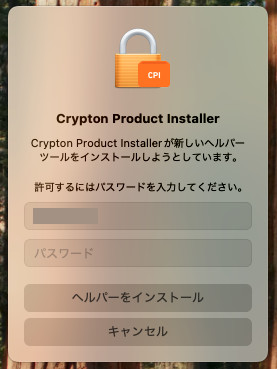
macOSをお使いの場合、今回のアップデート時に「新しいヘルパーツールのインストールの許可を求める」メッセージが表示される場合があります。案内に従ってパスワードを入力し、[ヘルパーをインストール] ボタンをクリックしてください。
ご注意
Apple シリコン搭載 Mac にて、現行バージョンの Piapro Studio NT2 を起動するにあたって Rosetta モードは必須ではございません。ただし、Logic Pro または GarageBand を Native モードで起動してご使用の場合、いくつかの制限事項や問題が確認されています。詳細はこちらからご確認いただけます。
該当のDAWをご使用いただく場合は、こちらを参考に、ホスト DAW アプリケーションを Rosetta モードで起動することを推奨いたします。
これまでの更新情報は https://piaprostudio.com/?p=9157 を参照ください。
SONICWIRE取扱い全製品を表示したい場合は、SONICWIREを日本語で閲覧されることをお奨めいたします。