『初音ミク NT』音声ライブラリ(v1.0.3.0) アップデート情報
本アップデートでは、以下の内容が更新されました。アップデート内容の全文は、こちらのページよりご確認いただけます。
アップデート内容
MIKU NT Original++
- 全体的に発音や音の明るさの見直しを行いました。
- ノイズの一部改善を行いました。
MIKU NT Dark++ / MIKU NT Whisper++
- ノイズや発音の一部改善を行いました。
アップデート適用方法
「購入製品一覧」ページより「NT」シリーズ製品欄の [導入/認証情報] をクリックし、インストーラをダウンロードの上で上書きインストールをいただくことでアップデートが完了いたします。
またPiapro Studio NT2 バージョン1.0.0.2以降をご利用の場合、Piapro Studio NT2の [ヘルプ] メニュー > [アップデートの確認…] からもアップデートを実行いただけます。
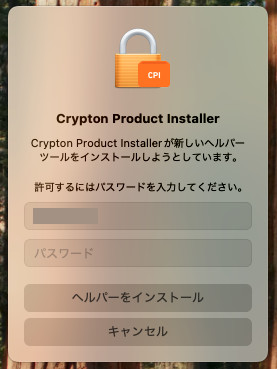
macOSをお使いの場合
macOSをお使いの場合、今回のアップデート時に「新しいヘルパーツールのインストールの許可を求める」メッセージが表示される場合があります。案内に従ってパスワードを入力し、[ヘルパーをインストール] ボタンをクリックしてください。
ご注意
Apple シリコン搭載 Mac にて、現行バージョンの Piapro Studio NT2 を起動するにあたって Rosetta モードは必須ではございません。ただし、Logic Pro または GarageBand を Native モードで起動してご使用の場合、いくつかの制限事項や問題が確認されています。詳細はこちらからご確認いただけます。
該当のDAWをご使用いただく場合は、こちらを参考に、ホスト DAW アプリケーションを Rosetta モードで起動することを推奨いたします。
これまでの更新情報は https://piaprostudio.com/?p=9418 を参照ください。
SONICWIRE取扱い全製品を表示したい場合は、SONICWIREを日本語で閲覧されることをお奨めいたします。