Piapro Studio NT2 v1.2.2.0 (Win/Mac) アップデート情報
本アップデートでは、以下の内容が更新されました。アップデート内容の全文は、こちらのページよりご確認いただけます。
過去のプロジェクトファイルの読み込みについて
本バージョンでは、v1.2.1.0以前で作成されたプロジェクトファイル(.ppsf)を初めて読み込む際、最新形式へのデータ変換処理が行われます。これはビブラート関連の動作改善に伴う内部処理の更新によるものです。変換には通常より時間がかかる場合がありますので、あらかじめご了承ください。
上記のビブラート関連の動作改善により、以前のプロジェクトファイルを読み込んだ際、ビブラート部分がわずかに変化する場合がございます。あらかじめご了承ください。
Windows環境でのSmartScreen警告について
一部のWindows環境において、本アップデートの実行時およびアプリケーションの初回起動時に、Microsoft Defender SmartScreenから「WindowsによってPCが保護されました」という警告が表示される場合がございます。
これはアプリケーションのデジタル証明書を更新したことに伴う一時的なものです。お手数をおかけいたしますが、画面内の「詳細情報」をクリックし、「実行」を選択して処理を続行していただきますようお願いいたします。
これはアプリケーションのデジタル証明書を更新したことに伴う一時的なものです。お手数をおかけいたしますが、画面内の「詳細情報」をクリックし、「実行」を選択して処理を続行していただきますようお願いいたします。
アップデート内容
■機能追加
- リアルタイムMIDI入力機能を追加しました。ピアノロール画面を開いているNTトラックに対して、リアルタイムでのMIDI入力が可能になりました。「Piapro Studioの設定」パネルより、使用するMIDI入力デバイスを指定してご利用ください。
- クオンタイズ機能を追加しました。選択中のノートのタイミングを自動補正します。実行時の設定は、「メニュー > ノート > クオンタイズの設定」から行えます。
■仕様変更
- ビブラートの種類を変更した際、自動推定されるビブラートの長さが、種類に応じて適切に変動するよう挙動を調整しました。
- 【重要】過去プロジェクトのピッチライン形状の変化について:上記の仕様変更、および後述するビブラート関連の不具合修正に伴い、以前のバージョンで作成されたプロジェクトファイルを読み込んだ際、ビブラート部分のピッチライン形状が以前と異なる場合がございます。あらかじめご了承ください。
- 編集済みのビブラートを「自動推定」の状態に戻した際、「深さ」と「周期」の値が自動推定時の値に戻るよう挙動を調整しました。
- 音素の入力欄を空白の状態で確定した際、入力されている歌詞に応じたデフォルトの音素設定へ自動的にリセットされるよう挙動を調整しました。
- スナップ機能をオフにした状態でも、3連符の設定がグリッドの表示に反映されるよう挙動を調整しました。
- プロジェクトの最大ソング長に上限(4/4拍子の場合は4,000小節)を設定しました。なお、すでにこの上限を超過しているプロジェクトファイル(.ppsf)を開く場合は、元のソング長が維持されます。
■バグ修正
- Ableton Live(VST版)およびBitwig Studioで、特定の条件下でプラグインを無効化した際、連続した再レンダリング等が発生して操作が困難になる問題を修正しました。
- 起動直後、歌声ライブラリの読み込み処理中に特定の操作を行うと、アプリケーションがフリーズまたはクラッシュする問題を修正しました。
- 特定の手順でリージョンを削除した後、Piapro Studio NT2の終了時にクラッシュする問題を修正しました。
- 「ビブラート:あり(手動設定)」を選択し、ビブラートの種類に「Release+」が含まれる状態にした場合に、指定したビブラート長とは異なる形状でビブラートが反映される問題を修正しました。
- ビブラートが付いていない状態から新たにビブラートが付与された際、「ノートの設定」パネルであらかじめ設定されていた「深さ」と「周期」の値が、ピッチラインの形状に反映されない問題を修正しました。
- 新規作成したノートにおけるビブラートの「深さ」と「ブレンド量」で、トラックの「Automatic Control」での設定が正しく適用されない問題を修正しました。
- オートメーショントラック上で「直線ツール」を用いてビブラートを描画する際、複数のボックスにまたがって書き込もうとすると、操作手順によっては一部のボックスに書き込み内容が反映されない問題を修正しました。
- 描画済みのピッチカーブを削除し、その範囲からビブラートが無くなった後、ピッチカーブの表示が実際の再生音と一致しなくなる場合がある問題を修正しました。
- 異なるパラメータ値を持つ複数のノートを選択している状態において、「ノートの設定」パネルのスライダーをクリックしても一部の項目で値が変更できない問題を修正しました。
- 手動で長さを設定した子音部分に干渉する位置に新しいノートを作成し、その後undoを実行した際、元の子音長が正しく復元されない問題を修正しました。
- Windows環境において、特定の操作を行った後、Enterキーを一度押下するまで一部のショートカットキーが機能しなくなる問題を修正しました。
- その他、軽微な不具合を修正しました。
アップデート適用方法
「購入製品一覧」ページより「NT」シリーズ製品欄の [導入/認証情報] をクリックし、インストーラをダウンロードの上で上書きインストールをいただくことでアップデートが完了いたします。
またPiapro Studio NT2 バージョン1.0.0.2以降をご利用の場合、Piapro Studio NT2の [ヘルプ] メニュー > [アップデートの確認…] からもアップデートを実行いただけます。
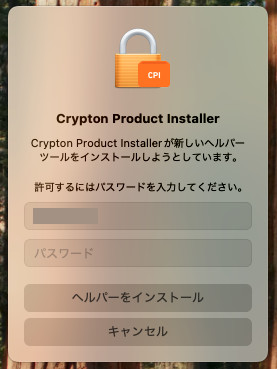
macOSをお使いの場合
macOSをお使いの場合、今回のアップデート時に「新しいヘルパーツールのインストールの許可を求める」メッセージが表示される場合があります。案内に従ってパスワードを入力し、[ヘルパーをインストール] ボタンをクリックしてください。
ご注意
Apple Silicon 搭載MacにおけるLogic Pro または GarageBandで本製品をお使いいただく場合に、いくつかの制限事項や問題が発生することが確認されています。詳細はこちらからご確認いただけます。
該当のDAWをご使用いただく場合は、こちらを参考に、ホスト DAW アプリケーションを Rosetta モードで起動することを推奨いたします。
これまでの更新情報は https://piaprostudio.com/?p=9157 を参照ください。
SONICWIRE取扱い全製品を表示したい場合は、SONICWIREを日本語で閲覧されることをお奨めいたします。