Piapro Studio NT2 v1.2.1.0 (Win/Mac) アップデート情報
本アップデートでは、以下の内容が更新されました。アップデート内容の全文は、こちらのページよりご確認いただけます。
アップデート内容
■機能追加
- ビブラートの「深さ」と「周期」を、オートメーションで制御できるパラメータを追加しました。
- Apple Silicon搭載Macにおいて、Nativeモードで起動したDAW上での動作に対応しました。
※Logic ProおよびGarageBand上でのご利用時は、引き続きRosettaモードでの起動を推奨いたします。
■仕様変更
- エディタウィンドウのボディ部分をドラッグした際の移動操作について、意図しない動作を防ぐため一部制限を設けるよう仕様を変更しました。
- オーディオ書き出し時の上書き確認ダイアログにおいて、Enterキーを押下した際は「別名保存」として処理されるよう挙動を変更しました。
■バグ修正
- オーディオトラックの削除後、アプリケーションの終了時や別のppsfファイルを開く際などにクラッシュする問題を修正しました。
- マーカーのコピー&ペースト実行時に、過去にコピーした別のマーカーも同時に貼り付けられてしまう問題を修正しました。
- ノートのビブラートを「なし(手動設定)」にして保存したppsfファイルを読み込み、該当ノートを含むフレーズを編集すると、ビブラートが意図せず再推定される問題を修正しました。
- オーディオ書き出し時の上書き確認ダイアログにおいて、Escキーを押下してもキャンセル処理が行われず、上書き保存されてしまう問題を修正しました。
- オーディオ書き出し時、ファイル名や保存先のパスが長すぎる場合に、警告ダイアログが表示されない問題を修正しました。
- その他、軽微な不具合を修正しました。
※v1.0.2.0 の更新以降、v1.0.1.2 以前で作成されたプロジェクトファイルを初めて読み込む際は、最新形式への変換処理が行われます。変換には通常より時間がかかる場合がありますので、あらかじめご了承ください。
アップデート適用方法
「購入製品一覧」ページより「NT」シリーズ製品欄の [導入/認証情報] をクリックし、インストーラをダウンロードの上で上書きインストールをいただくことでアップデートが完了いたします。
またPiapro Studio NT2 バージョン1.0.0.2以降をご利用の場合、Piapro Studio NT2の [ヘルプ] メニュー > [アップデートの確認…] からもアップデートを実行いただけます。
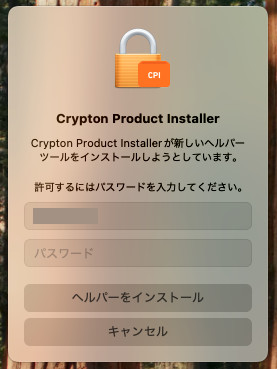
macOSをお使いの場合
macOSをお使いの場合、今回のアップデート時に「新しいヘルパーツールのインストールの許可を求める」メッセージが表示される場合があります。案内に従ってパスワードを入力し、[ヘルパーをインストール] ボタンをクリックしてください。
ご注意
Apple Silicon 搭載MacにおけるLogic Pro または GarageBandで本製品をお使いいただく場合に、いくつかの制限事項や問題が発生することが確認されています。詳細はこちらからご確認いただけます。
該当のDAWをご使用いただく場合は、こちらを参考に、ホスト DAW アプリケーションを Rosetta モードで起動することを推奨いたします。
これまでの更新情報は https://piaprostudio.com/?p=9157 を参照ください。
SONICWIRE取扱い全製品を表示したい場合は、SONICWIREを日本語で閲覧されることをお奨めいたします。