Piapro Studio NT2 v1.2.0.0 (Win/Mac) アップデート情報
本アップデートでは、以下の内容が更新されました。アップデート内容の全文は、こちらのページよりご確認いただけます。
アップデート内容
■機能追加
- オーディオファイルの書き出し時に、選択したトラックを個別にファイル出力する機能を追加しました。
- のりツールを追加しました。隣接する、または複数選択されたリージョンやノートを、1つに結合することができます。
- ビブラートの「深さ」と「周期」を調整できるパラメータを追加しました。
- Dynamicsトラックにおけるオートメーションカーブの目盛りを、「%」または「dB」に切り替えられる機能を追加しました。切り替え時に表示カーブの形状が変化しますが、実際の出力音量には影響しません。
- プラグイン版のPiapro Studio NT2で編集内容に変更があった際、ホストDAW側へ通知を送る機能を追加しました。プロジェクト終了時の未保存警告に反映されます。
※macOS版のAbleton Liveにおいては、VST版のみ対応しています。
■仕様変更
- メモリ使用量を軽減しました。
- ビブラート機能の拡張に伴い、ノートの設定パネル内の「ビブラート」タブのレイアウトと項目を最適化しました。
- 選択中の書き込み済みピッチラインに対し、消しゴムツールでのクリック操作でもデータ消去を行えるよう挙動を改善しました。
- 初回起動時のデフォルト設定において、ノート編集モードでのピッチライン表示が「オン」になるよう変更しました。
■バグ修正
- テンポイベントを曲の終端側から手前へ順に変更操作した際に、クラッシュする場合がある問題を修正しました。
- macOSのスタンドアロン版において、ウィンドウ最小化などによりエディタが非表示の状態の際、メニューやショートカットキー操作を行うとクラッシュする問題を修正しました。
- オーディオデバイス関連の設定変更のキャンセル時、正常に動作していない問題を修正しました。
- 特定の手順で休符区間のオートメーションイベントを削除した際、実際の再生音に反映されず、削除前のパラメータが適用されたまま再生されてしまう問題を修正しました。
- ノートの編集で空移動(実質的な移動が発生しない操作)が生じた場合、その後に該当ノートを含むフレーズを編集するとクラッシュする問題を修正しました。
- 後続のノートと子音で接続されているノートを「Sil」に変更した際、クラッシュする問題を修正しました。
- 手動でビブラートを適用したノートを子音単体の音素に変更した後、通常の歌詞に戻すなどの操作を行うとクラッシュする問題を修正しました。
- その他、軽微な不具合を修正しました。
※v1.0.2.0 の更新以降、v1.0.1.2 以前で作成されたプロジェクトファイルを初めて読み込む際は、最新形式への変換処理が行われます。変換には通常より時間がかかる場合がありますので、あらかじめご了承ください。
アップデート適用方法
「購入製品一覧」ページより「NT」シリーズ製品欄の [導入/認証情報] をクリックし、インストーラをダウンロードの上で上書きインストールをいただくことでアップデートが完了いたします。
またPiapro Studio NT2 バージョン1.0.0.2以降をご利用の場合、Piapro Studio NT2の [ヘルプ] メニュー > [アップデートの確認…] からもアップデートを実行いただけます。
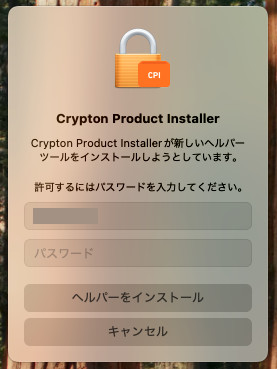
macOSをお使いの場合
macOSをお使いの場合、今回のアップデート時に「新しいヘルパーツールのインストールの許可を求める」メッセージが表示される場合があります。案内に従ってパスワードを入力し、[ヘルパーをインストール] ボタンをクリックしてください。
ご注意
Apple Silicon CPU (M1, M1 Pro, M1 Max, M1 Ultra etc.) 搭載の MacBook, Mac mini, iMac, Mac Studio などでは、Piapro Studio NT2は “Rosetta” モードで動作します。
プラグイン版をご使用の際は、こちらを参考に、ホスト DAW アプリケーションを Rosetta モードで起動してください。
これまでの更新情報は https://piaprostudio.com/?p=9157 を参照ください。
SONICWIRE取扱い全製品を表示したい場合は、SONICWIREを日本語で閲覧されることをお奨めいたします。