Piapro Studio NT2 v1.1.3.0 (Win/Mac) Update Information
This update includes the following changes. You can view the full update details on this page.
Update Details
■Changes
- [Windows] Improved keyboard shortcuts to function correctly even when the IME is in "Full-width (Zenkaku)" input mode.
- Optimized background rendering processes to prioritize the current playback position when loading files or using the plug-in version.
- Removed "32 bit (int)" from the Audio Export settings, as this format is not supported.
■Bug Fixes
- Fixed an issue where the application would rarely crash during Audio Export.
- Fixed an issue with saved .ppsf files where editing a phrase following a "cl" note could cause a crash.
- Fixed an issue where the application would crash during time signature manipulation after consecutively importing .vsqx files that contain different time signature changes.
- Fixed an issue where manual vibrato was not applied to specific notes when "n" (ん) lyrics occurred consecutively.
- [Windows] Fixed incorrect behavior when the Scroll Setting was set to "Ableton Live type".
- [macOS] Fixed incorrect behavior when the Scroll Setting was set to "Bitwig Studio type".
- Fixed an issue where sample sounds might not play depending on the Master Tempo settings.
- Fixed an issue where deleting a track would not take effect while the Piano Roll was open.
- Fixed other minor issues.
*Due to updates introduced in version 1.0.2.0, when opening project files created with version 1.0.1.2 or earlier for the first time, a “conversion to the latest format” process will occur, which may take longer than usual. Thank you for your understanding.
How to Apply This Update
Click on the "DL/LICENSE" button in the "LICENSED PRODUCT" page, and download the latest installer and run it to complete the update.
If you are using Piapro Studio v1.0.0.2 or later, you can also update the software from [Check for Updates...] in the [Help] Menu.
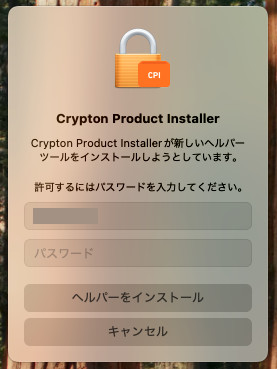
For macOS users
When using macOS, you may see a message asking to "allow the installation of a new helper tool" during this update. Follow the instructions, enter your password, and click the [Install Helper] button.
Notice
On MacBook, Mac mini, iMac, Mac Studio, and other devices equipped with Apple Silicon CPUs (M1, M1 Pro, M1 Max, M1 Ultra, etc.), Piapro Studio NT2 runs in “Rosetta” mode.
If using the plugin version, please refer to this link to start your host DAW application in Rosetta mode.
For previous update information, please refer to https://piaprostudio.com/?p=9157.
SONICWIRE取扱い全製品を表示したい場合は、SONICWIREを日本語で閲覧されることをお奨めいたします。