Piapro Studio NT2 v1.0.2.0 (Win/Mac) Update Information
This update includes the following changes. You can view the full update details on this page.
Update Details
■Performance Improvements
- Improved processing speed for editing, saving, and loading operations by updating the internal data format.
- Please note that when opening older project files for the first time, additional time may be required to convert them to the latest format.
■Synthesis Enhancements
- Improved vocal synthesis for more natural and smoother singing expression.
- Corresponding voice libraries have been updated accordingly.
*Due to changes in the synthesis process, output results may differ from previous versions.
■Reduced CPU Load
- Lowered CPU usage when applying VoiceVoltage, SuperFormantShifter, and VoiceDrive.
■New Features
- Added a “Page Scroll” option to the auto-scroll modes.
- Added customizable keyboard shortcuts. You can open the settings window as follows:
- Windows: Menu Bar → [Settings] → [Keyboard Shortcuts...]
- macOS: Menu Bar → [Piapro Studio NT2] → [Keyboard Shortcuts...]
- Added an option "Disable Automatic Control" on a per-track basis.
■Other Specification Changes
- Added a specification where the results of Automatic Control may vary slightly for each track.
- Pitch curves drawn before/after saving are now retained even if notes or regions are muted.
- Automation curve deletion behavior now follows the “Automation Write Mode” setting.
- Improved the behavior of the “Pitch Emphasis Adjustment” slider in Automatic Control.
- Changed the default interval for automatic backup at first launch from 5 minutes to 2 minutes.
- Removed the per-note option for enabling/disabling automatic pitch estimation.
- Various minor adjustments and refinements.
■Bug Fixes
- Fixed an issue where the Piapro Studio NT2 dialog would not appear in the foreground during update checks when launching the plugin version, making operation difficult.
- Fixed a crash that could occur when loading certain saved .ppsf files under specific conditions.
- Other minor bug fixes.
How to Apply This Update
Click on the "DL/LICENSE" button in the "LICENSED PRODUCT" page, and download the latest installer and run it to complete the update.
If you are using Piapro Studio v1.0.0.2 or later, you can also update the software from [Check for Updates...] in the [Help] Menu.
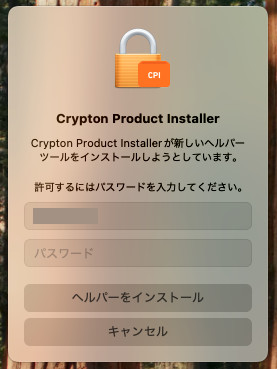
For macOS users
When using macOS, you may see a message asking to "allow the installation of a new helper tool" during this update. Follow the instructions, enter your password, and click the [Install Helper] button.
Notice
On MacBook, Mac mini, iMac, Mac Studio, and other devices equipped with Apple Silicon CPUs (M1, M1 Pro, M1 Max, M1 Ultra, etc.), Piapro Studio NT2 runs in “Rosetta” mode.
If using the plugin version, please refer to this link to start your host DAW application in Rosetta mode.
For previous update information, please refer to https://piaprostudio.com/?cat=186.
SONICWIRE取扱い全製品を表示したい場合は、SONICWIREを日本語で閲覧されることをお奨めいたします。